
Fast one-click PDF export
Hover the toolbar, select PDF, and click Export. ChatCache turns the current ChatGPT conversation into a clean PDF fast.
Code blocks, LaTeX math, tables, and images render exactly as they do in ChatGPT - no broken formatting, no truncation. Hover the Export button, pick PDF or Word, and click.
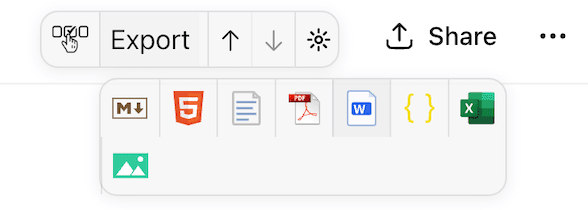
PDF and Word are the headline exports: hover over Export, choose the PDF or Word icon, and download the conversation. The same compact menu also gives you Markdown, HTML, text, JSON, CSV, and image exports.
Hover the toolbar, select PDF, and click Export. ChatCache turns the current ChatGPT conversation into a clean PDF fast.
Save ChatGPT conversations as Word documents for editing, sharing, and handing off polished notes.
PDF, Word, Markdown, HTML, text, JSON, CSV, and PNG are one tap away from the same export control.
Jump between prompts with the side-panel outline before you export a long conversation.
ChatGPT conversations are full of code, LaTeX math, tables, and images. ChatCache preserves every detail in the PDF and Word output - clean enough to share, edit, print, and archive without cleanup.
DALL-E outputs, uploads, and inline graphics
Data tables with headers, alignment, and structure
Syntax highlighting and language labels preserved
LaTeX math renders flawlessly - the most powerful math export of any extension
Whether you are archiving research, sharing with your team, or building a knowledge base, ChatCache is the ChatGPT exporter built for serious users.
Open the popup, click export, done. Download ChatGPT conversations instantly. No configuration, no sign-up.
Most formats export locally in your browser. PDF generation uses a secure API. No tracking, no analytics.
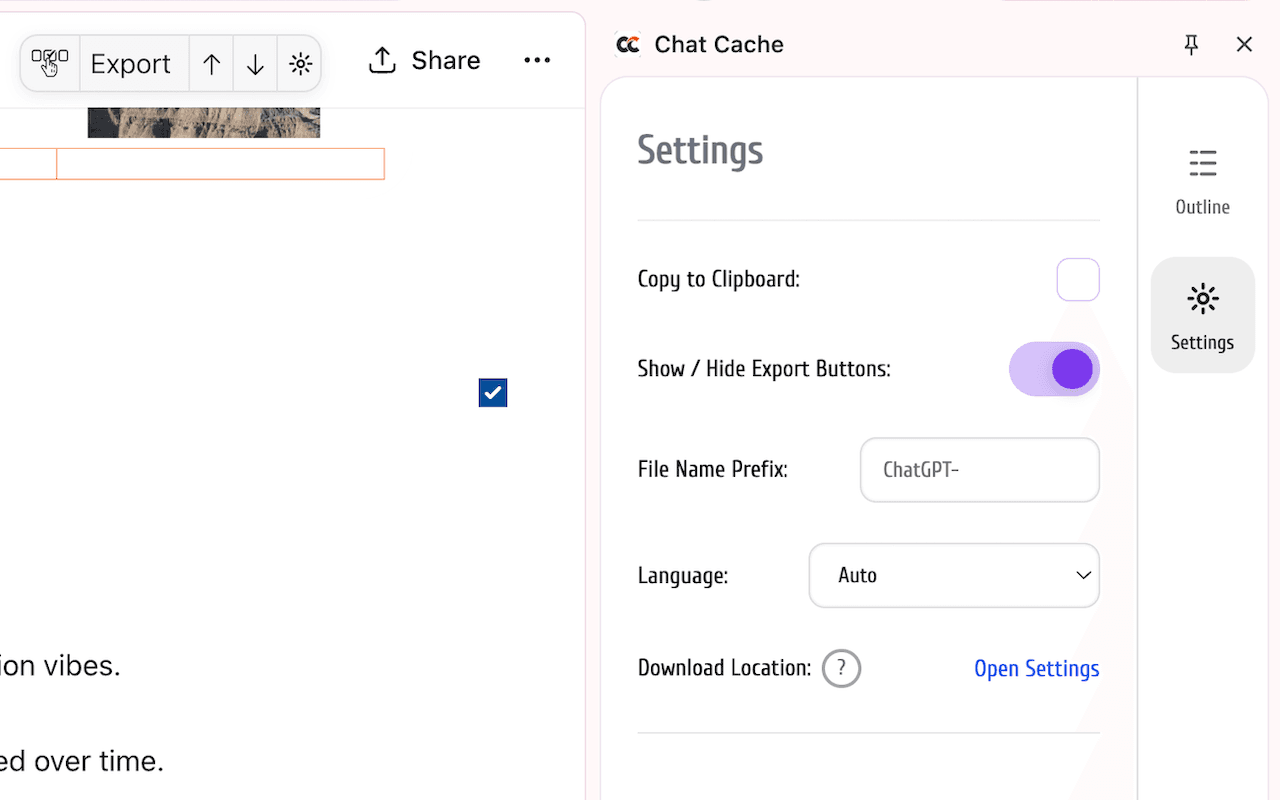
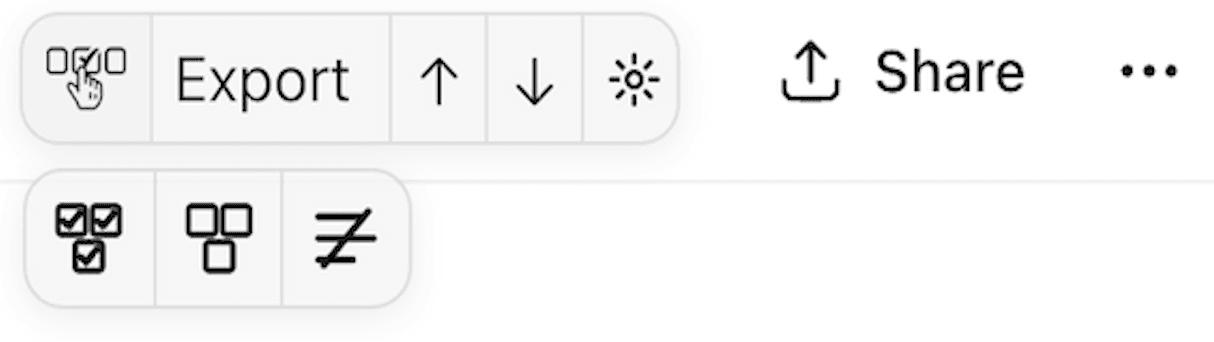
Pick exactly which turns to keep, use select-all or select-none presets, or hide checkboxes when you want a clean page again.
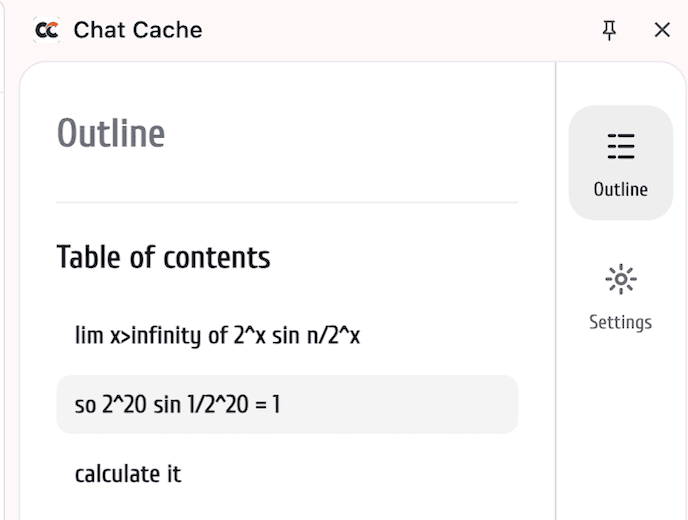
Open the side panel to see your prompts as a table of contents, then jump directly to the question you need.
Move up and down between prompts without manually scrolling through a massive ChatGPT thread.
Save hours every week. Power users say they don't know how they worked without it - keeps your study and work flow moving.
PDF, Word, Markdown, HTML, TXT, JSON, CSV, and PNG. ChatGPT to PDF converter, Word exporter, and Markdown exporter in one tool.
Export 700+ page PDFs and 252-page docs in one click. 10,000+ tokens, no truncation, no missing messages, no crashes - fast and easy.
ChatCache now ships extension locale catalogs and language settings so the product can meet more users where they work.
Send bugs and ideas from the extension side panel so the roadmap stays tied to real export workflows.
Pick exactly which messages to print or export - yours, the AI's, or any mix. The export button counts your selection in real time, and the hover presets let you select everything, clear everything, or remove checkboxes completely.
Long ChatGPT threads are hard to scan. ChatCache now gives you an Outline side panel made from your own questions, plus compact up/down controls on the page toolbar.
|b⃗| = √(3² + (−3)² + 9²) = √99
So
cos θ = 6399 = 711
Therefore
θ = cos−1 (711)
θ ≈ 50.48°
|b⃗| = √(3² + (−3)² + 9²) = √99
So
cos θ = 6399 = 711
Therefore
θ = cos−1 (711)
θ ≈ 50.48°
LaTeX formulas, fractions, square roots, and Greek symbols export as a beautifully typeset PDF - identical to what ChatGPT shows, down to every symbol and superscript. STEM students and researchers get cleaner PDFs for long prompts, code blocks, images, links, and source-heavy conversations.
Save ChatGPT chat history and export conversations for any workflow.
Export code snippets and technical explanations. Save ChatGPT code to Markdown for GitHub repos and documentation.
A lifesaver for study flow. Save math, study notes, and research summaries as clean files - and reclaim hours every week.
Preserve AI-generated insights and analysis. Archive ChatGPT conversations for reproducible research.
Archive creative ideas and content drafts. Export ChatGPT brainstorms to your favorite writing tools.
Share ChatGPT conversations across your organization. Export and distribute AI outputs to stakeholders.
Save blog post ideas and marketing copy. Backup ChatGPT content drafts for your editorial workflow.
No setup, no learning curve. Install the free ChatGPT export extension and start saving conversations in seconds.
Navigate to the conversation you want to save. ChatCache activates automatically on chatgpt.com.
Use the toolbar or side panel to jump between prompts, select only the messages you need, and choose your export settings.
Export to PDF, Word, Markdown, HTML, TXT, JSON, CSV, or PNG, then share it, print it, or archive it anywhere.
Install the ChatCache Chrome extension, open any ChatGPT conversation, hover over the Export button, choose PDF or Word, and click Export. Code blocks, tables, images, math, and formatting are preserved in a clean file.
Yes, ChatCache is completely free with no paywalls or premium tiers. All 8 export formats (PDF, Word, Markdown, HTML, TXT, JSON, CSV, PNG) are available at no cost.
Yes, ChatCache is stress-tested for large conversations with thousands of messages. No truncation, no missing content, and no crashes even with code-heavy technical discussions. The new Outline and question navigation controls also make long threads easier to scan before exporting.
Yes. Open the ChatCache side panel and choose Outline. It lists your prompts as a table of contents, and each item jumps back to the matching question inside the ChatGPT conversation.
ChatCache supports 8 formats: PDF, Word (DOCX), Markdown (MD), HTML, plain text (TXT), JSON, CSV, and PNG. Each format preserves the original conversation structure including code blocks, tables, images, and LaTeX formulas.
ChatCache uses no analytics and no trackers. Markdown, HTML, TXT, DOCX, JSON, CSV, and PNG exports run entirely in your browser. PDF export uses a secure HTTPS API for rendering, and no data is stored after processing.
Yes. ChatCache adds per-message checkboxes to every ChatGPT conversation. Pick individual turns, use the select-all or select-none presets, or export only the AI responses and skip your prompts. The export button updates the count in real time as you make selections.
No. ChatCache is a Chrome extension that works immediately after installation - no sign-up, no login, no configuration required. Open any ChatGPT conversation and the export toolbar appears automatically.
Install ChatCache and start exporting ChatGPT conversations in one click. Free, private, and instant.